Hydrants
If one or more hydrants are selected, the following properties are displayed in the properties palette:
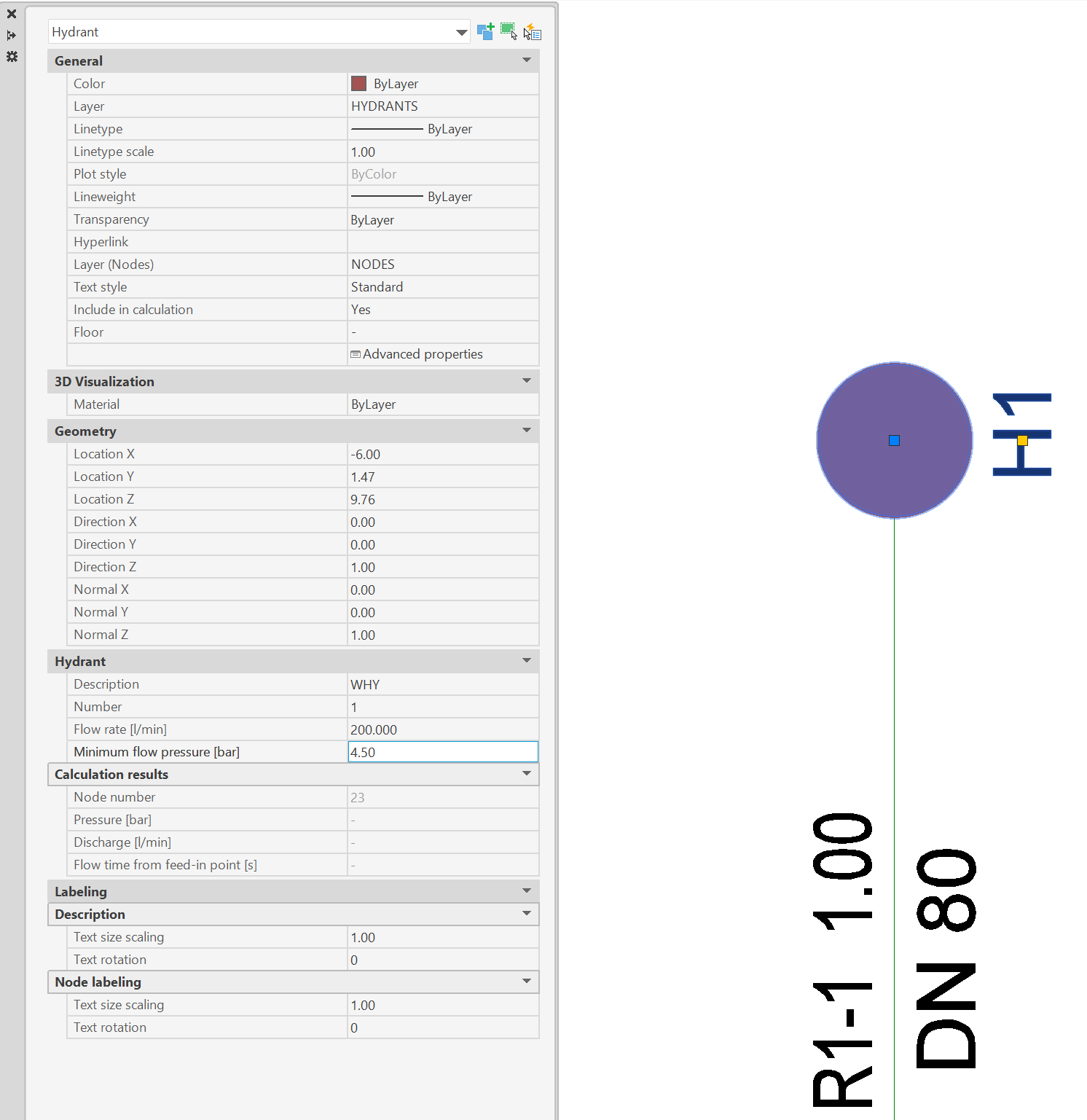
- Category General: In addition to AutoCAD/BricsCAD object properties such as colour, layers and layers of labels, the following data of the hydrant can be adjusted:
- Include in calculation: If "No" is selected, the hydrant will be ignored in the next calculation run.
- Floor: The floor, that the hydrant is assigned to (see Floors)
- Advanced properties: Opens the properties dialog for the specific hydrant (see Edit/ modify by properties dialog)
- Category Hydrant: The following characteristics for the hydrant can be entered in this area:
- Description: Text in drawing, that the hydrant is labeled with
- Number: Number of hydrant
- Delivery rate [l/min]: Required delivery rate of hydrant
- MInimum flow pressure [bar]: Required pressure on hydrant (only visible in calculation with Hydrant System)
- Category Calculation Results: Properties in this category cannot be changed and show the results of the last calculation run.
- Category Labeling:
- Text size scaling and text rotation for labels of hydrants
Related topics: