Toolbar Input Program


Functions of the Toolbar of Input program
The grayed-out icons are only active when used with the Calculation Program. See also Create Output Window.

 Insert a new project
 Copy an existing project
 Minimize the Output Window for the current project
 Maximize the Output Window for the current project
 Arrange the windows of the current project
 Links the Project Window to the open Output Window so that when one window is resized, the other is automatically resized as well (on/off switch)
 Create a Branch pipe
 Create a Downpipes and risers
 Create a Distribution pipe
 Create Main distribution pipe
 Create a Supply pipe
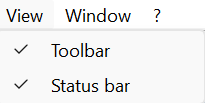
You can turn the input program's toolbar on and off using the “View” menu option.