Structure input program


Structure of the input program - WinSprink
The name of the program (WinSprink) and the name of the loaded file are displayed at the top of the program window.
The menu bar and toolbar of the program window are located below this.
The status bar is at the bottom.
Each file has a project window.
A project tree can be seen in the left part of the project window.
This project tree can contain several projects. See also Open an empty project
If you select an item (e.g. mode of operation), an input mask appears in the right-hand part of the project window, in which the corresponding data can be entered.
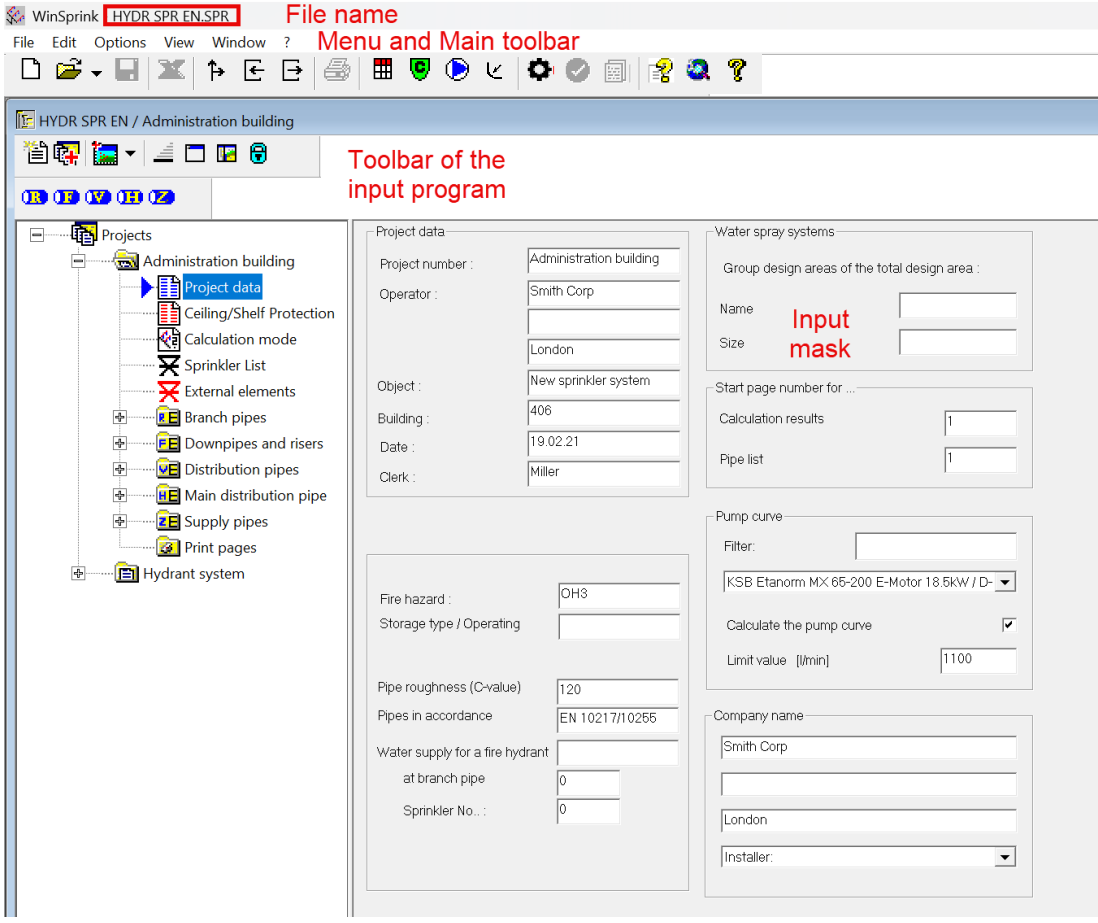
New pipes are entered using the toolbar for project elements.
The toolbars contain further functions that are explained in more detail in other chapters.
The method of operation is always from top to bottom, starting with the operating area sprinkler in the direction to the feed-in point in sprinkler equipment room/water tank.
In addition to the project window, there is also the output window.
The calculation program is accessed via the output window.