Enter branch pipes
Icon:

One or more branch pipes can be entered, whereby a branch pipe can consist of several sub-elements.
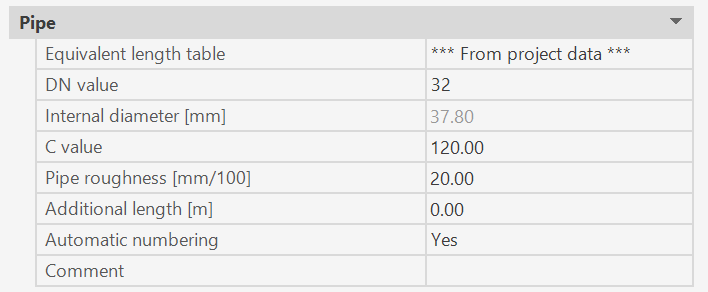
After executing this command, the following input options appear in properties:
Note: Sprinklers can only be calculated, if they are connected to a branch pipe!
Each branch pipe is assigned the predefined properties.
During the command sequence, the data can be changed at any time.(*)
The start and end points of the branch pipe are entered as a line according to chapter entering pipes as line.
The starting point of the connecting branch pipe is the end point of the previous sub-element, i.e. it does not have to be entered again.
A "thread" appears from this starting point to the current mouse position.
This "thread" is carried along with movements of the mouse.
Once "entering branch pipes" is completed (if necessary consisting of several sub-elements), all pipes and branch pipes that contain start or end points of a new branch pipe are disassembled at these points and provided with new sub-numbers.
The new branch pipe will also be disassembled and re-labeled, if start or end points of other pipes/branch pipes are located on this specific branch pipe.
(*)
If the value of the CAD system variables COMMANDPROPERTIES equals 0, nothing is displayed in the properties palette.
Instead the DN value of the new branch pipe is retrieved once the command is executed.
Related topics: