Convert lines to branch pipes
Icon:

Lines in AutoCAD/BricsCAD can be converted to branch pipes.
After executing this command, the following input options appear in properties:
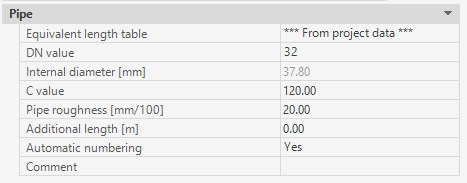
Each branch pipe is assigned the predefined properties.
During the command sequence, the data can be changed at any time.(*)
After clicking on the icon, the following dialog appears in the command line:

Lines can now be selected. The entry will be completed by clicking <RET> or right-click on the mouse.
In the next step, selected lines can be deleted automatically or preserved:

Then selected lines will be converted to SpriCAD-Branch pipes.
(*)
If the value of the CAD system variables COMMANDPROPERTIES equals 0, nothing is displayed in the properties palette.
Instead the DN value of the new branch pipe is retrieved once the command is executed.
Related topics: