


This menu item includes the print and export functions for BMP and EMF formats and is activated after activating the output window for calculation - see also toolbar.
Symbol:

Function: The print window appears. The print settings can be made.
Matching menu bar:
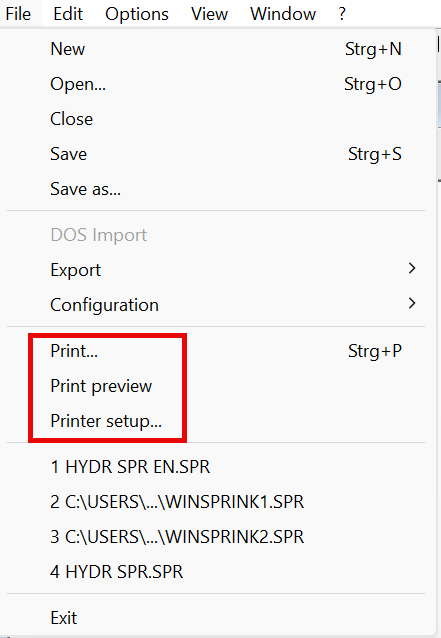
Function: Allows to check how the log pages will look before printing.
Function: Sets up the printer before printing.
Function: Allows to export excerpts of pages of calculation results for inclusion in plans or emails, for example.
The BMP format is a file format for a photographic image of the calculation results and can appear in any photo program.
Icon:

Function: Export a section of the calculation results as a BMP file.
When activated, the button remains pressed and is thus active. A cross symbol appears on the cursor and the section can be defined.
Drag the window open as required and right-click:
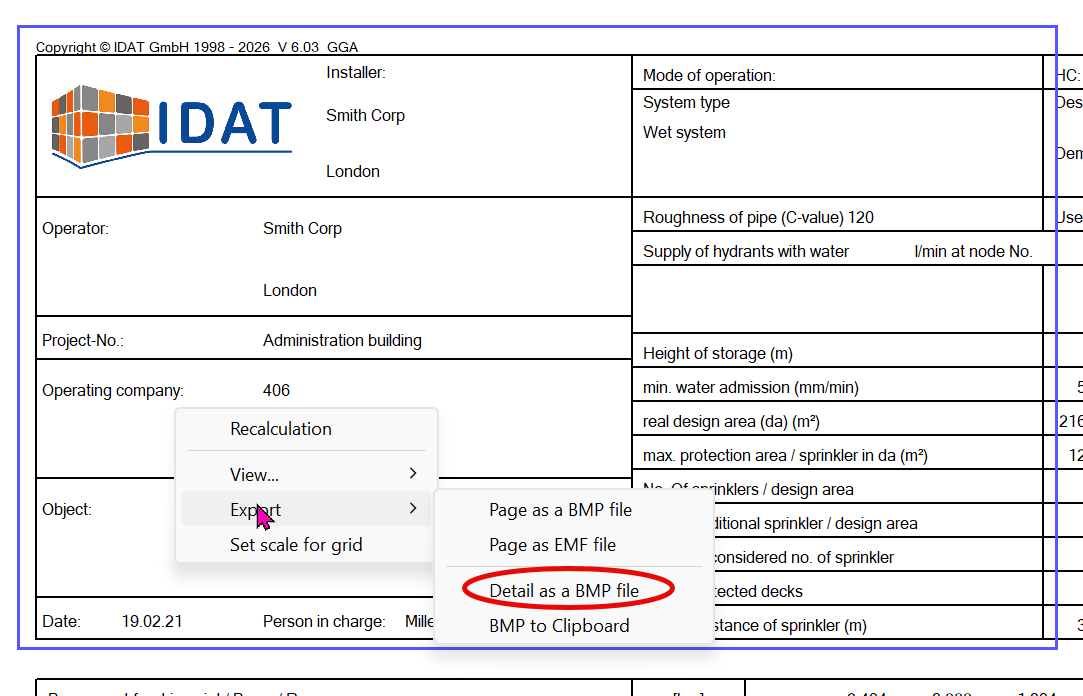
Select Export and then Section as BMP file. Enter a file name and save the file.
Click on the icon again to end the function.
EMF is an abbreviation and stands for Windows Enhanced Meta-File.
This type of file can be read into a word processing program (e.g. MS-Word/ Excel), but only as an image.
This can be useful if, for example, a report is to be created in which logs or graphics (pump characteristic curve) are to be used.
After selecting this menu item, a Windows dialog box appears in which the user can enter the file name.
The user can specify the path as a default setting.
The most important data can also be transferred directly to an Excel spreadsheet in the recent step.